2.1.0
RELEASED August 23, 2026This one is about work not disappearing. Two things in Sapari were quietly losing edits: cuts and b-roll you added before hitting Analyze would vanish the moment analysis finished, and saved drafts never actually came back — saving looked like it worked, and the version was nowhere. Both are fixed, and drafts now do what they always said on the button. The rest is the kind of thing you only notice once it stops happening.
Trim a section or drop in b-roll before you run analysis, and it's still there afterwards — on the timeline and in the exported video. Previously it disappeared the moment analysis finished, with nothing to tell you it had.
Save the current cut as a named version, come back to it later, and load it. Your framing, crop, captions and format come back with it. Save a vertical version for TikTok and a wide one for YouTube on the same project.
B-roll set to mix now plays underneath your voice instead of replacing it. If you had a clip that seemed to mute your narration, that was this.
- Pre-analysis edits survive
Cuts and b-roll added before analysis stay on the timeline through every re-analysis, and are included when you export.
- A cleaner edit list
Projects no longer show a stray placeholder item in the edit list before they've been analyzed.
- Deleting media cleans up after itself
Removing a clip from your library no longer leaves behind edits pointing at something that isn't there.
- Saved versions actually appear
A draft saved on an analyzed project shows up in the drafts list, which it previously never did.
- Framing comes back with the draft
Loading a draft restores its format, crop, flips and caption styling. Save at 16:9 and reload at 9:16 and the framing adapts rather than cropping to the wrong place.
- Your analysis settings are left alone
Loading a draft no longer resets pacing, censorship, director notes or the caption language.
- Drafts from an earlier analysis are labeled
Re-analyze a project and older drafts stay in the list marked as belonging to a previous analysis, instead of quietly vanishing.
- B-roll audio mixes instead of replacing
A b-roll clip set to mix its audio now plays under the main track rather than silencing it.
- Captions match the preview exactly
Caption sizing lines up with what you see in the editor, down to the pixel, at every resolution.
- One caption size default
Caption size falls back to the same value everywhere instead of three different ones depending on where it was set.
- Export from a draft on your phone
Pick a version you saved on desktop and export it from mobile. Saving and renaming drafts is still desktop-only.
- Signing in with Google works on existing accounts
If you first signed up with an email and password, signing in with Google now links to that account instead of failing.
- A failed sign-in tells you what happened
When Google sign-in doesn't go through, the login screen explains why rather than returning you to an empty form.
- Changing a password you already set
If you signed up with Google and later added a password, changing it now asks for your current one, the same as every other account.
- Deleted accounts stay deleted
Signing in with Google on a deleted account no longer creates a fresh one on the same address.
- Reliability work across exports and background processing
2.0.0
RELEASED August 15, 2026This one is mostly foundation. Sapari used to treat your main footage and your b-roll as two completely different things — separate libraries, separate uploads, separate everything — which meant every new feature had to be built twice and usually landed in one place months before the other. That split is gone. There's one library now, one way video works, and one place to build on. You'll notice it as a simpler library and a pile of fixes. The bigger payoff is everything it makes possible next.
Main footage and b-roll share a single library. Anything you upload can be reused in any project, organized into folders, and trimmed in place — no more uploading the same clip twice for two different purposes.
Sapari recognizes a file you've already uploaded and stores it once, so re-adding the same clip to another project doesn't eat your storage again.
Sapari now has a real model for what's on screen at any moment, instead of assuming it's always one video. That's the groundwork for multi-source layouts — split screen, talking head, picture-in-picture — and for most of what's sitting on the roadmap.
- One library, both kinds of video
Footage and b-roll live together. Everything in the library can be used as either, in any project.
- Reuse across projects
Add a clip to the library once and pull it into any project without re-uploading.
- Folders and trimming
Organize the library into folders, and trim any item in place on desktop or mobile.
- Storage counted once
The same file added twice is stored once and billed against your quota once.
- Screen recordings just work
Silent sources — screen captures, animations, clips with no audio track — no longer stall analysis. Sapari detects them and skips the steps that need sound.
- Controls that make sense
Options that depend on audio switch off when a project has no sound anywhere, and stay available when only some clips are silent.
- Captions scale correctly
Caption placement and size match the preview at any export resolution.
- Exports without a name
Fixed a failure when exporting a project you never named.
- Intro and outro ordering
Fixed clips added as an intro showing in the wrong position during review.
- Cleaner mobile export summary
The captions badge no longer overflows its row on small screens.
- No more endless loading
Opening a project that was deleted, or that isn't yours, now says so instead of spinning forever.
- Interrupted uploads clean themselves up
An upload abandoned partway — a closed tab, a dropped connection — is now detected and cleared instead of sitting in your library as a broken entry.
- Better security across the board
A round of hardening on how accounts and sessions are protected. You'll sign in once more after this ships — nothing else about your account changes, and no password reset is needed.
- One model for video
Footage and b-roll were rebuilt on a single foundation, so features land everywhere at once instead of arriving in one place and catching up in the other later.
- A real timeline model
Sapari now tracks what's on screen at each moment as its own thing. Today that renders exactly what it did before — it's what multi-source layouts get built on next.
- Fewer moving parts
Two upload paths became one, two libraries became one, and a lot of duplicated machinery went away. Less to go wrong, and faster to add to.
1.6.0
RELEASED June 21, 2026Captions go where you want them. Drag any caption anywhere on the frame, drop it onto a snap grid, and place lines independently — and what you see in the preview is exactly what renders. Around that, a round of account and reliability work: longer "remember me" sessions, smoother sign-up, and steadier billing.
Drag captions anywhere on the frame and snap them to a grid for clean alignment. Position individual lines on their own, and undo or redo every move. The preview matches the final export exactly.
"Remember me" now keeps you logged in for up to 30 days — across page refreshes and devices, not just until the tab closes.
Fixed sign-up failures for names with more than one word and for Google and GitHub accounts, so getting started just works.
- Place captions anywhere
Drag a caption to any spot on the frame and it snaps to an alignment grid — no more fixed positions only.
- Per-line positioning
Move individual caption lines independently, so multi-line captions can sit exactly where each line reads best.
- Undo and redo caption moves
Caption repositioning joins the editor's undo history — step back and forward through moves like any other edit.
- What you see is what you export
Caption placement in the preview now matches the rendered video frame-for-frame.
- Longer "remember me" sessions
Choosing "remember me" at login keeps you signed in for up to 30 days, across devices.
- Sign-up fixes
Names with more than one word, and Google / GitHub sign-ups, no longer fail partway through.
- Cleaner login and plan screens
Already signed in? You skip the login page. The plan screen now has a quick sign-out and a link to the community.
- Export settings save reliably
Fixed a crash when saving certain export configurations to a draft.
- Steadier billing
Plan and pricing data stays in sync more reliably behind the scenes.
- "What makes content good" in Portuguese
Our essay on what makes content actually good is now available in Brazilian Portuguese, diagrams and all.
1.5.0
RELEASED May 27, 2026Sapari speaks Portuguese and Spanish now. Pick a language from the top-right of the nav, and the whole product follows — the editor, the marketing site, every email, every error, every menu, every tooltip. Logged-in users save the choice to their account so it travels between devices: set Portuguese on your laptop, open Sapari on your phone, and it's already in Portuguese.
English, Brazilian Portuguese, and Latin American Spanish. The editor, marketing site, account settings, billing, error messages, every email — pick once, the whole product follows.
Sapari saves your locale on your account, not just in the browser. Open it anywhere — phone, laptop, a friend's machine after you log in — and it picks up where you left off.
Brazilian Portuguese — usuário, arquivo, tela, the BR-creator vocabulary, not pt-PT. Neutral Latin American Spanish — no vosotros, no Castilian-only idioms. Brand and tool names (Sapari, CapCut, Descript, Premiere Pro) stay as-is.
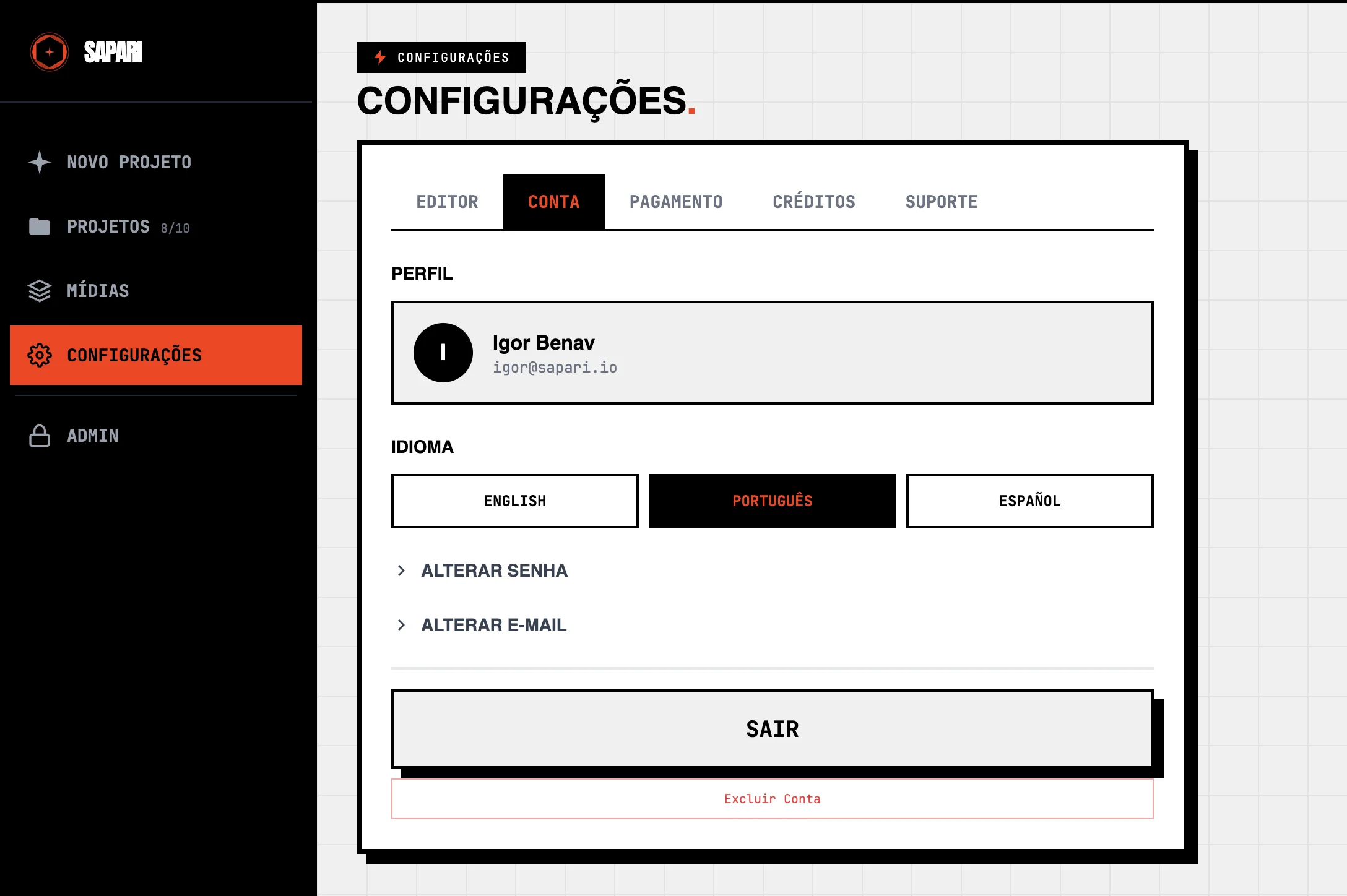
Pick your language in Account
Account → Idioma picks English, Português, or Español. The whole product reloads in that language and the choice is saved to your user — so it travels between devices and browsers. The navbar on landing has a matching switcher for anonymous visitors.

The editor, in your language
Every label, every button, every chip — EDIÇÕES, SILÊNCIO, INÍCIO FALSO, MÍDIA, MANUAL, PALAVRÃO, MANTER, INSERIR MÍDIA. The cards on the timeline narrate the cuts in the language you set: 'PAUSA ENTRE PALAVRAS' in pt, 'PAUSA ENTRE PALABRAS' in es, 'PAUSE BETWEEN WORDS' in en.
- Portuguese (Brazilian)
Editor, marketing site, blog, account, billing, errors, emails — every customer-facing surface. Brazilian conventions throughout (você, gerunds, usuário, arquivo, tela).
- Spanish (neutral Latin American)
Same coverage as Portuguese. Neutral LatAm phrasing — no vosotros, no Castilian-only vocabulary.
- Language switcher in the nav
Top-right of every page, on landing and inside the app. Pick a language, the page reloads in that language, your choice persists.
- Set it once in Account
Account → Language saves the locale to your user, so it travels between devices and browsers.
- Format settings persist across reloads
Aspect ratio, crop (zoom and pan), and flip choices are saved per project and restored when you come back. No more reconfiguring exports every time you reload.
- Dates render in your locale
Credit ledger, billing screen, payment history, project list — all dates now use the format your locale expects (25/05/2026 in pt, 5/25/2026 in en).
- Analysis notifications, translated
When an analysis finishes, the toast ('Captions ready' / 'Análise concluída' / 'Análisis completo') and its body line both arrive in the language you set.
- Landing site, fully translated
Home, pricing, the 19 SEO/use-case/vs pages, the blog feed, every newsletter touchpoint — all available at /pt/* and /es/*.
- Blog supports inline diagrams
Posts can now embed inline diagrams alongside prose. The new 'What makes content good' post uses them to walk through the four categories of content that actually performs.
- Mobile nav surfaces BLOG and DOCS
The header on mobile now shows BLOG and DOCS links alongside the language switcher — no more hunting through a hamburger for cross-site destinations.
- Error messages, in your language
Validation errors, permission errors, billing errors, CSRF errors — every customer-facing service exception now flows through the translation catalog instead of leaking English to non-English users.
- Dependency security bumps
Patched advisories across backend (mako, urllib3, python-multipart, idna, authlib, pymdown-extensions), frontend (@babel/plugin-transform-modules-systemjs, fast-uri, brace-expansion), landing (astro, devalue), and worker (ws).
1.4.0
RELEASED May 22, 20261.4 is about two things: GIFs, and exports. Drop a GIF in as a clip or as B-roll and it just plays — animated, in the cut, like any other footage. And a run of export failures got hunted down and fixed: if an export ever died on you mid-render, the handful of things most likely to have caused it are gone.
Upload a GIF as source footage, or drop an animated one in as B-roll or an overlay — it animates in the edit and in the export, like any other clip.
A cluster of render crashes — silent video used as an overlay, an audio file placed as a visual, a clip missing its duration — is fixed. Fewer exports die mid-render.
The export dialog's caption switch remembers what you set during analysis instead of resetting off. And dragging a cropped video to reposition it works again.
- GIF as a clip
Upload a GIF as source footage — it joins the timeline as a silent clip and exports like any other video.
- Animated GIF as B-roll or overlay
Drop an animated GIF in as an asset and it animates in the preview and the final render — no more frozen first frame.
- Export crashes hunted down
Exports could fail mid-render when a project used a silent video clip as an overlay, an audio file placed as a visual element, or a clip whose duration hadn't been read. All three now render cleanly.
- Caption switch remembers your choice
Open the export dialog and the captions toggle reflects whether you set a caption language during analysis — it no longer resets off every time.
- Drag to reposition a cropped video
When a clip is cropped to a different aspect ratio, dragging the video in the preview to reframe it works again.
1.3.0
RELEASED May 20, 20261.2 was about removing friction. 1.3 widens what Sapari is. There's a blog now — practical writing about content creation, editing, marketing, branding, and the craft of making video that lands. Subscribe and you'll get new posts and release notes when there's something worth a heads-up. On the editor side, uploads with no audio — screen recordings without a microphone, silent demos, animation exports — now go through cleanly. The features that need audio quietly step out of the way; everything else still works.
Practical writing on editing, marketing, branding, credibility — the work around the cut. Search, tags, year filters, and an RSS feed for whatever reader you use.
Drop in a screen recording with no microphone, an animation export, anything without an audio track. It uploads and edits cleanly. AI features that need audio dim themselves; manual editing still runs.
Double opt-in, one-click unsubscribe in every email, and the signup form tells you what went wrong if anything does — server down vs invalid email vs too many tries.
- Blog at sapari.io/blog
Magazine layout up top, archive below. Multi-select tag filtering, year filtering, full-text search, RSS feed.
- Newsletter signup
On the blog and in the footer. One field, one confirmation email, you're in. Every email has a one-click unsubscribe and an entity address (CAN-SPAM, GDPR).
- Specific error messages
If the signup form hits a snag, it tells you what — server unreachable, invalid email, rate-limited — instead of bouncing you a generic 'try again.'
- Silent video uploads
Screen recordings without a microphone, animation exports, anything with no audio now uploads, edits, and renders.
- Audio controls dim when there's nothing to do
If every clip in the project is silent, Pacing, False Starts, Clean Sweep, Caption Language, and Profanity all gray out with a 'no audio' note. Manual editing stays available.
- No wasted credits on silent projects
Hitting Analyze on an all-silent project gets a clear message instead of running an empty pipeline and charging you for it.
1.2.0
RELEASED May 16, 20261.0 went out, you uploaded, you sent the feedback. 1.2 is what came back. Clicking anywhere on the timeline now seeks — even on top of an edit. Multi-file uploads finally land every file you drop. Audio assets dropped over a video insert play through it instead of getting silenced or rejected, and you control insert-audio and overlap-audio independently. Video assets in the wrong shape no longer have to letterbox — flip a switch and reframe them to fill the project. Notifications take you straight to the thing they're notifying you about. And the Google sign-in tells you it's working. Smaller release than 1.0, fewer fireworks. The point of this one is the friction it removes.
The timeline seeks to your click, even when it lands on an edit. No more opening AssetFocus just to scrub to a moment inside an edit region.
Multi-file uploads for clips and assets now land every file you drop. With live per-row progress and one button to stop everything if you change your mind.
Click 'Analysis complete' and you land on the project. Click 'Export ready' and you land on the file. Click a failure and you land where you can retry.
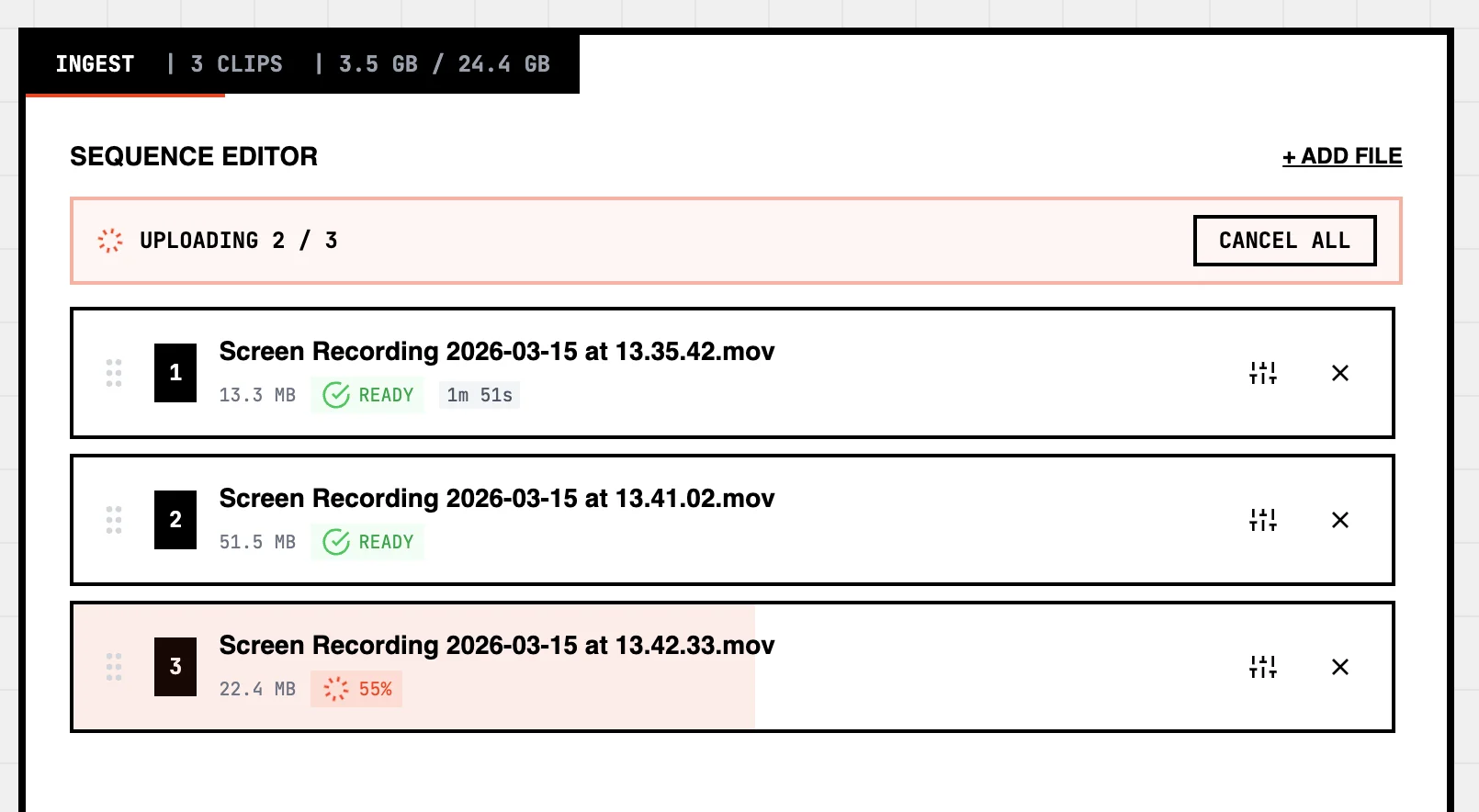
Upload everything at once
Drop a batch and every file lands. The strip up top counts the queue down — UPLOADING 2 / 3, UPLOADING 3 / 3 — each row fills with its own progress, and one CANCEL ALL button stops the whole batch if you change your mind. Same shape for clips going into a project or assets going into a group.
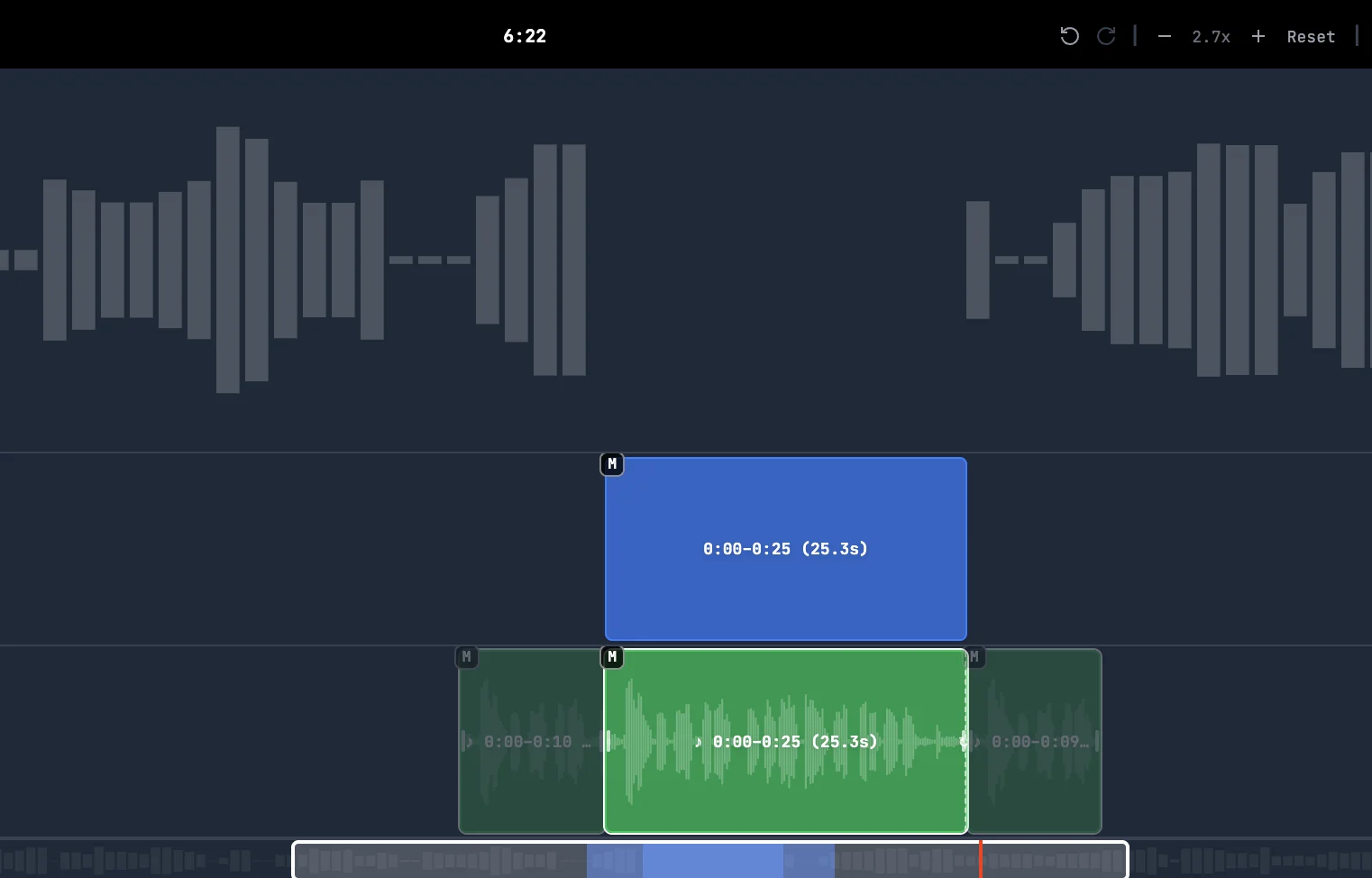
Anchor an asset to an insert
When an asset overlaps an insert, you now have three choices instead of two. Merge keeps the asset playing through the insert and out the other side. Split breaks it into two pieces, one inside the insert and one after. Anchor pins the asset to the insert: it ends when the insert ends, and the portion that would have overflowed is dimmed in the preview so you can see what's being trimmed before you commit.
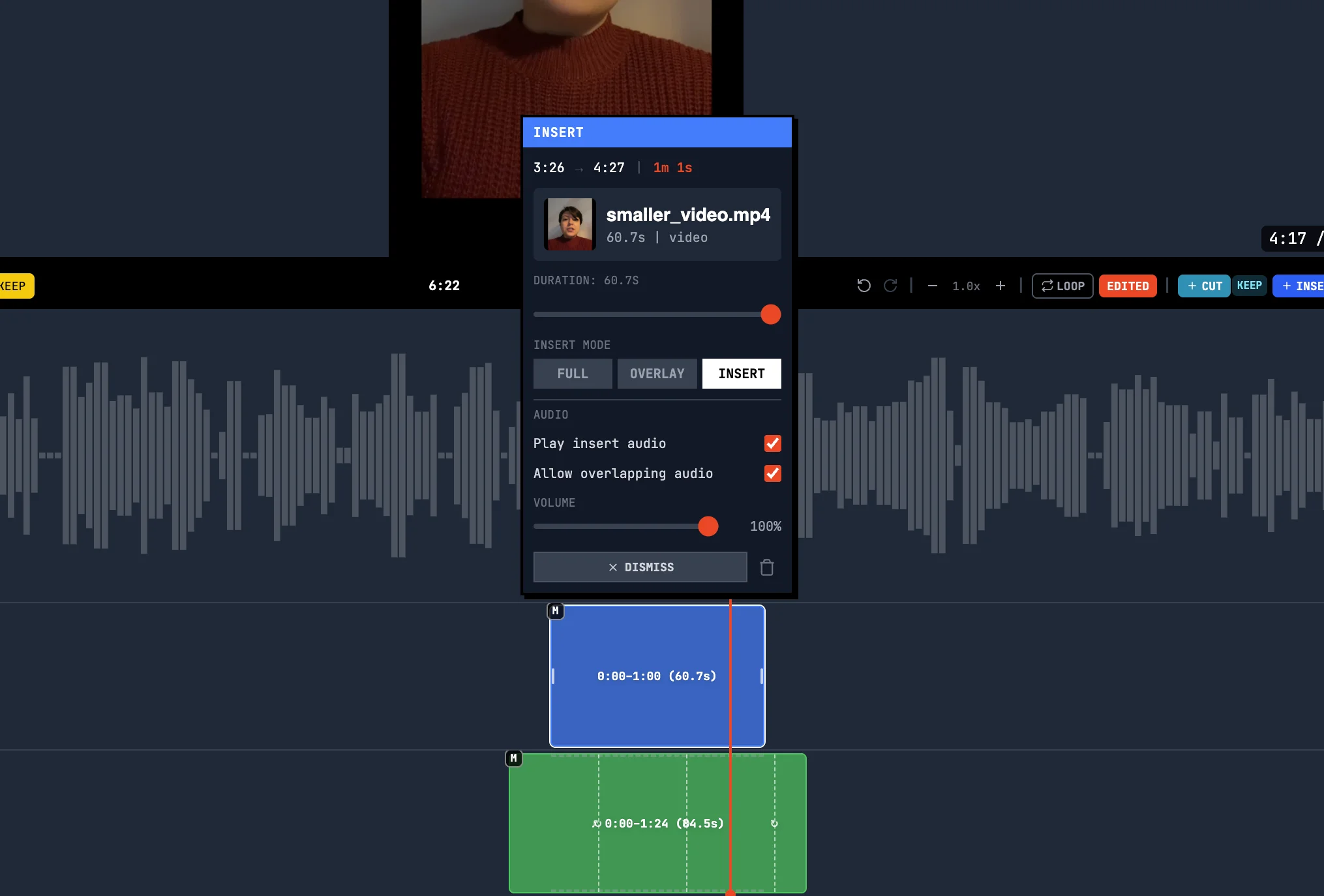
Two switches for insert audio
Insert audio used to be one toggle with four states that didn't map cleanly to how inserts actually play. Now there are two switches per insert: one for the insert's own audio, one for any other audio that falls inside the same range. Set them independently — keep the insert's music and mute the original, play both at once, or silence everything. Anything muted by your choice is dimmed in the timeline so the silencing is visible instead of hidden.
Reframe a portrait asset into a landscape project
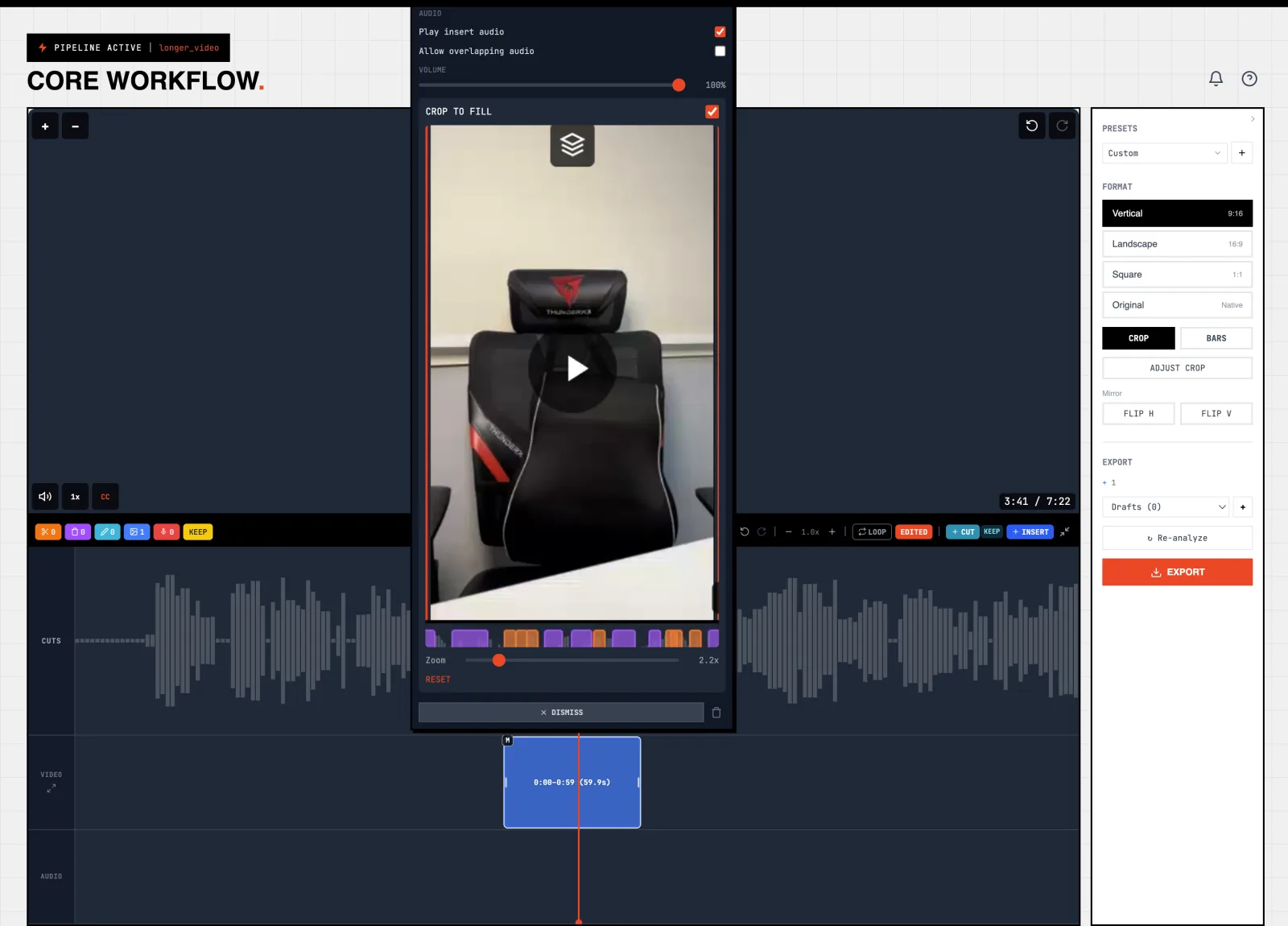
Drop a vertical clip into a 16:9 project and the default is still to letterbox — black bars on either side, no surprises. But now there's a Crop to fill switch on each video and image asset, including the ones you splice into the middle of a project and the intros and outros you tack on. Flip it on, zoom in, drag to pan, and the asset fills the frame instead. Each asset reframes independently — keep some letterboxed and crop others, in the same project, in the same render. If you later switch project aspect ratio, the crop adapts automatically.
- Click-to-seek on edits
The timeline seeks to your click regardless of what overlay it lands on.
- Drag assets between groups
Reassign an asset by dragging the card onto a different group header.
- Audio plays during inserts
Drop an audio asset onto a spliced video clip and it plays through the insert instead of disappearing. Drop a long one and it still saves — even when the asset extends past the original video's end.
- Independent insert-audio controls
Each insert has two switches: whether the insert's own audio plays, and whether other audio assets in the same range play alongside it or get muted. Anything muted by your choice is dimmed in the timeline so you can see it.
- Anchor mode for overlapping assets
A third option alongside merge and split: anchor an asset to an insert so it ends when the insert ends. The portion that would have overflowed is dimmed in the preview so you can see what's being trimmed.
- Overlap controls match what you see
When you click an asset, the per-insert mode toggles only show the inserts your asset actually overlaps in the rendered timeline — and the time labels match where you see those inserts.
- Reframe video assets per edit
Toggle Crop to fill on any video or image asset to swap the default letterbox for a cover-fit reframe. Zoom and pan to pick which slice of the source fills the frame. Each asset reframes independently. If you change project aspect ratio later, the crop adapts.
- Reliable multi-file drops
Drop a batch of clips or assets and every file lands. No more 'I dropped 5, only 1 showed up.'
- Cancel All
One button stops the batch. Files that already finished survive; queued ones drop.
- Resume where you left off
Cancel a partial upload and retry later — it picks up where you stopped instead of starting over.
- Friendlier file filtering
Drag a folder of mixed file types and the unsupported ones land in a 'skipped' banner instead of breaking the upload.
- Notifications deep-link
Clicking a notification takes you to the project, export, or page you'd expect.
- Google sign-in shows feedback
Spinner, status label, and a real error message if the sign-in fails. No more wondering whether you clicked it.
- Bigger profanity dictionaries
More words detected in English, Spanish, Portuguese, and French based on what you reported missing.
- Cleaner progress display
Analysis progress now reads smoothly start to finish — no more numbers occasionally counting backwards.
- Onboarding tooltips fit your screen
Tour tooltips on narrow phones no longer get cropped at the bottom.
- Sharper PWA icons
The Sapari icon in your dock, taskbar, or home screen now has a clean solid background.
1.1.0
RELEASED May 9, 2026Quiet release. Under-the-hood improvements only — more reliable analysis, smoother deploys, and a handful of billing edge cases patched. No new features in this one; call it groundwork.
- More reliable analysis
Progress updates flow smoothly and the analysis pipeline recovers cleanly from rare hiccups.
- Smoother deploys
If we deploy while your render or analysis is mid-flight, it gets retried instead of failing partway through.
- Billing edge cases
A handful of rare subscription-state mismatches now self-heal.
1.0.0-beta
RELEASED May 1, 2026Every long-form recording fights the same battles — dead air, retakes, audio that's either too quiet or too hot, captions that have to feel native to whatever feed the video lands on. 1.0.0 makes all of that a single analysis pass. You upload, the AI runs, and the timeline comes back with reviewable cards: keep what works, dismiss what doesn't, drag boundaries on anything in between. Every render is free, and one project becomes 16:9, 9:16, and 1:1 from the same edit.
Silence, false starts, audio cleanup, captions, and B-roll placement all run in a single analysis. ~0.3× the recording length.
Every AI decision is an approvable card on the timeline. Nothing exports without your sign-off.
16:9, 9:16, and 1:1 from the same project. Convert by letterbox or crop+pan.
Cards on a timeline
Silence, false starts, and B-roll suggestions land as colored cards on the timeline. Click to keep, dismiss, or drag boundaries. Nothing renders without your sign-off — the AI proposes, you decide.
Edit on your phone too
Full editor on mobile — swipe through cards, pinch to zoom into the timeline, haptic feedback on every approval. No app to install. Works on the bus.
Three formats from one source
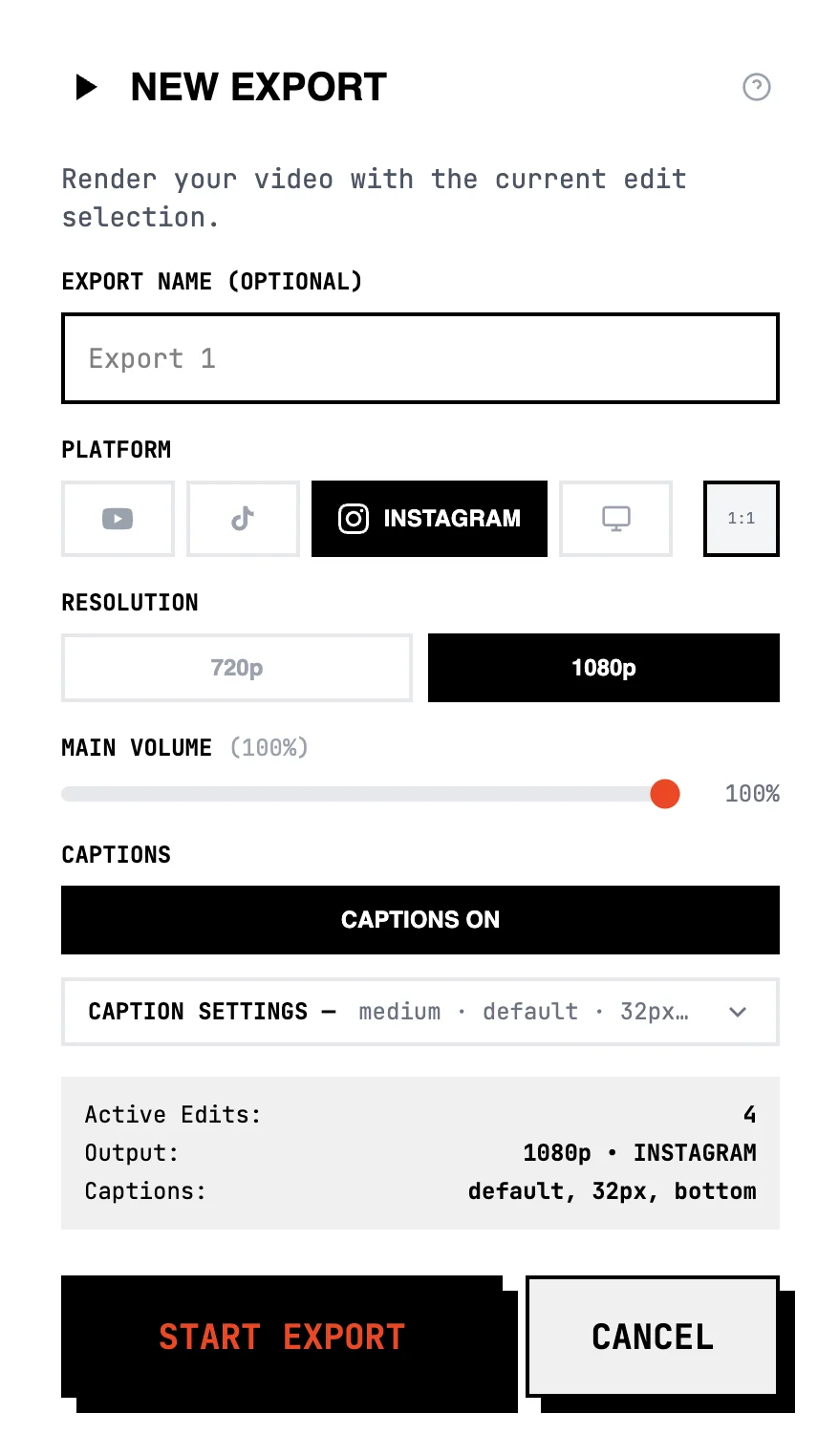
Pick an aspect ratio at export. The same edit becomes 16:9 for YouTube, 9:16 for TikTok and Reels, 1:1 for LinkedIn and Instagram. Letterbox preserves framing; crop+pan fills the frame and follows the action.
Audio at broadcast standard
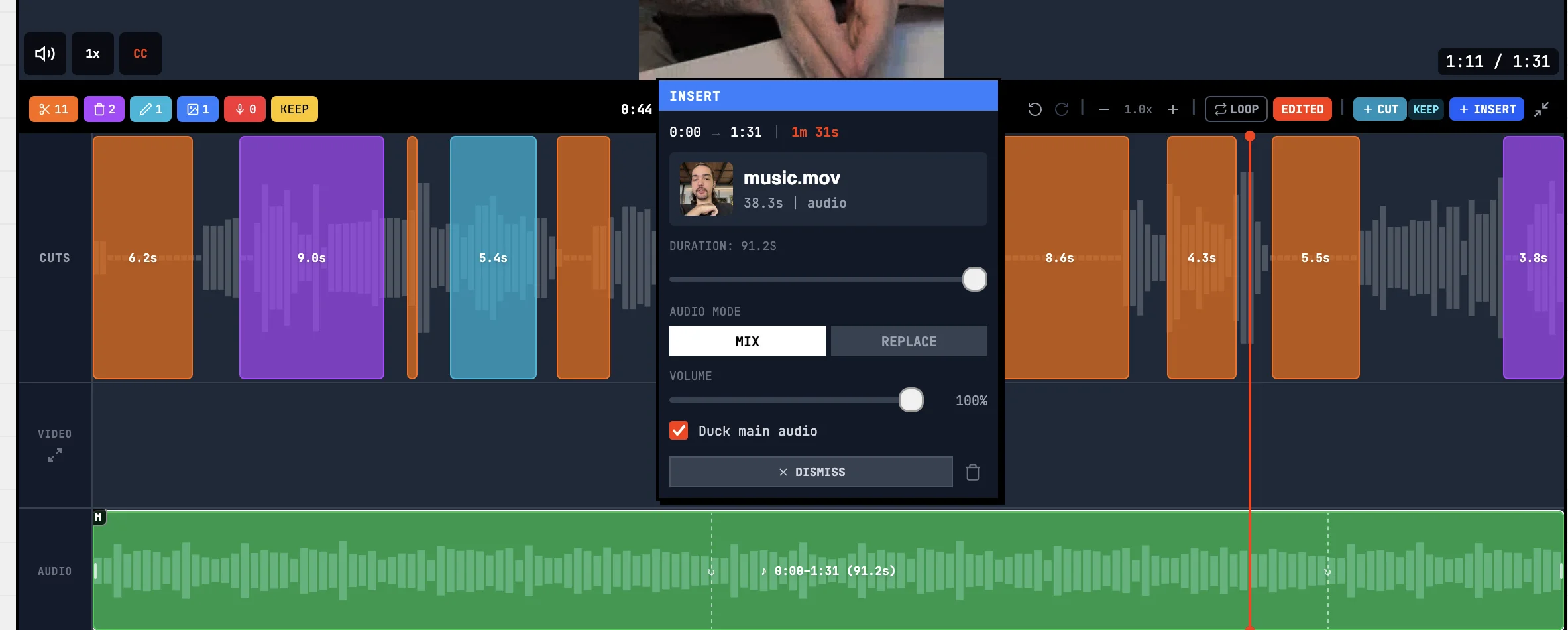
Loudness normalization to −14 LUFS (the EBU R128 broadcast standard, also what Spotify and YouTube target). Asset music ducks under voice automatically. Profanity bleeps land on the word, not somewhere near it.
- Multi-clip projects
Up to 100 clips concatenated into one continuous timeline.
- Word-level cut precision
Cuts land between words, never mid-syllable.
- Card-based review
Every detected cut is an orange (silence), purple (false start), or blue (B-roll) card. Keep, dismiss, or drag the boundary.
- Original vs edited A/B comparison
Toggle between raw recording and edited version on the same player.
- Aspect ratio preview
Switch between original, 16:9, 9:16, and 1:1 in the editor with letterbox or crop.
- Mobile editor
Swipe review for cuts, pinch-to-zoom focus modes, haptic feedback. Runs on phone, no install.
- Silence removal
Pacing slider from Off (3000ms threshold) through Natural and Balanced to Hyper (400ms).
- False start detection
Catches restarted thoughts — "wait, let me say that again" — without touching deliberate pauses.
- AI Director for B-roll
Reads the transcript and places your assets at moments that fit. Three modes: overlay, replace, insert. Up to 10 AI-directed placements per analysis; manual placement is unlimited.
- Profanity filter
Bleeps audio at the word, masks captions partially ("f*****g") or fully ("*******").
- Multi-language transcription
English, Spanish, Portuguese, French. Word-level timing on all four.
- Director notes
Free-text guidance the AI applies during analysis — tone, pacing intent, terms to keep.
- Aspect-aware caption defaults
9:16 ships with 72px short lines and 12% margin to clear platform UI. 1:1 lands at 56px, 16:9 at 40px.
- Position presets
Top, center, bottom. Margins auto-adapt per aspect ratio (5% horizontal, 6% square, 12% vertical).
- Audio cleanup
EBU R128 loudness normalization to −14 LUFS (broadcast standard).
- Asset audio mixing
Background tracks duck under voice automatically.
- One timeline, three formats
16:9 (1920×1080), 9:16 (1080×1920), 1:1 (1080×1080) from a single project.
- Orientation conversion
Letterbox to preserve framing, or crop with pan to fill.
- Free re-renders
Change anything, re-export. No extra credit cost.
- Tier-based retention
7 days (Free), 14 days (Hobby), 30 days (Creator and Viral).
- Free trial
7 days. 30 AI minutes. No credit card.
- Four tiers
Free, Hobby, Creator, Viral. Watermark removed on Hobby and up.
- YouTube import
Paste a URL and edit the video directly. Available on Viral.
- Web-based
Runs on any modern browser. No download, no install.